Python Data Bootcamp

: for GIS Dummies

Hyesop Shin

University of Auckland

March 2, 2024

The Auckland Challenge

Questions we cannot answer with GIS software alone:

  • Where should we put 1,000 new e-scooter parking zones?
  • Which SA2 areas have the worst accessibility to green spaces?
  • How do pedestrian flows change hour by hour?
  • What if we implemented congestion charging?

Answer: We need to write code.

From Questions to Code

Traditional GIS (QGIS, ArcGIS):

  • Click → Select → Buffer → Join → Export
  • Great for one-off analysis, but hard to reproduce
  • Cannot handle millions of trips automatically

Programming (Python):

for zone in auckland_sa2:
    accessibility = calculate_15min_amenities(zone)
    if accessibility < threshold:
        flag_for_intervention(zone)

Result: Reproducible, scalable, shareable

Why Python for GIS?

1. Open source and free: No licence fees, works on any platform

2. Massive ecosystem:

┌─────────────────────────────┐
│  Your Geospatial Code       │
├─────────────────────────────┤
│  geopandas | osmnx | r5py   │ ← Spatial libraries
├─────────────────────────────┤
│  pandas | numpy | matplotlib│ ← Data science
├─────────────────────────────┤
│  Python 3.10+               │ ← Language
└─────────────────────────────┘

3. Reproducibility: Anyone can run the same code and get the same results

How will we cover it?

  • Install Python on your machine (Default)
  • Google Colab (only for today)
  • Jupyter lab / PyCharm / VS Code (Optional)


Make sure you are well set up with Google Colab using the URL below:
https://colab.research.google.com

What will we cover today?

  • Variables and data types
  • Lists
  • for loops
  • Conditional statements


Helpdesk: Wednesday 12pm-2pm Lab Sessions | Ed Discussion

Web book: https://dataandcrowd.github.io/python-gis/ for self-paced practice

Part 1: Variables and Data Types

For the first time

print("Hello World")
  • Commenting on a Python Notebook or Google Colab
# This is a single-line comment

'''
This is a multi-line comment
Line 1
Line 2
'''

Variables: Storing Information

  • A variable is a location in memory that stores a value.
weather = "Freezing"
print(weather)

Variables with Auckland data

# Store a number
population = 1_700_000

# Store text (a string)
city = "Auckland"

# Store a calculation
density = population / 1180  # Population per km²

# Display results using f-strings
print(f"{city} has {population:,} people")
print(f"Density: {density:.1f} people per km²")
Auckland has 1,700,000 people
Density: 1440.7 people per km²

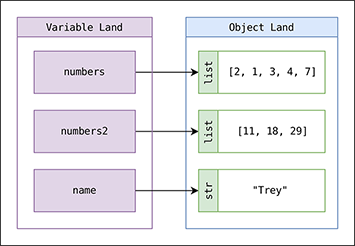
Variable as pointer

x = [1, 2, 3]
y = x
  • You have created two variables x and y which both point to the same object.
x = 'something else'
print(y)  # y is unchanged
  • The = operator changes what the name points to, not the object itself.

Built-In Types

Data type Description Example
int Whole integer values 4
float Decimal values 3.1415
str Character strings 'Freezing'
bool True/false values True


x = 4         # int
x = 3.14159   # float
x = 'hello'   # str
x = True      # bool

type(x)       # Check what type a variable is

Strings

weatherForecast = "Freezing"
type(weatherForecast)

# Concatenation
print(weatherForecast + weatherForecast)
print(5 * weatherForecast)

# Case transformations
print(weatherForecast.upper())
print(weatherForecast.lower())

Operators

  • Addition a + b | Subtraction a - b | Multiplication a * b
  • True division a / b | Floor division a // b
  • Modulus a % b | Exponentiation a ** b
print(11 / 2)   # 5.5
print(11 // 2)  # 5

Comparison and Boolean Operations

# Comparisons: ==  !=  <  >  <=  >=
25 % 2 == 1    # Is 25 odd? True

# Boolean operators: and, or, not
x = 4
(x < 6) and (x > 2)    # True
(x > 10) or (x % 2 == 0)  # True
not (x < 6)             # False

Practice 1: Fill in the blanks

# 1. Store information about two Auckland landmarks
sky_tower_lat = ____
sky_tower_lon = 174.7633
gallery_lat = -36.8567
gallery_lon = ____

# 2. What data types are these?
name = "Sky Tower"
height = 328
is_tallest_in_nz = ____

print(type(name))       # ____
print(type(height))     # ____
print(type(is_tallest_in_nz))  # ____

# 3. Calculate the difference in latitude and longitude
diff_lat = gallery_lat ____ sky_tower_lat
diff_lon = gallery_lon - sky_tower_lon
print(f"Latitude difference: {diff_lat:.4f}")
print(f"Longitude difference: {____:.4f}")

Hint: Sky Tower lat = -36.8485, Art Gallery lon = 174.7722. The Sky Tower is the tallest structure in NZ.

Part 2: Lists

Lists

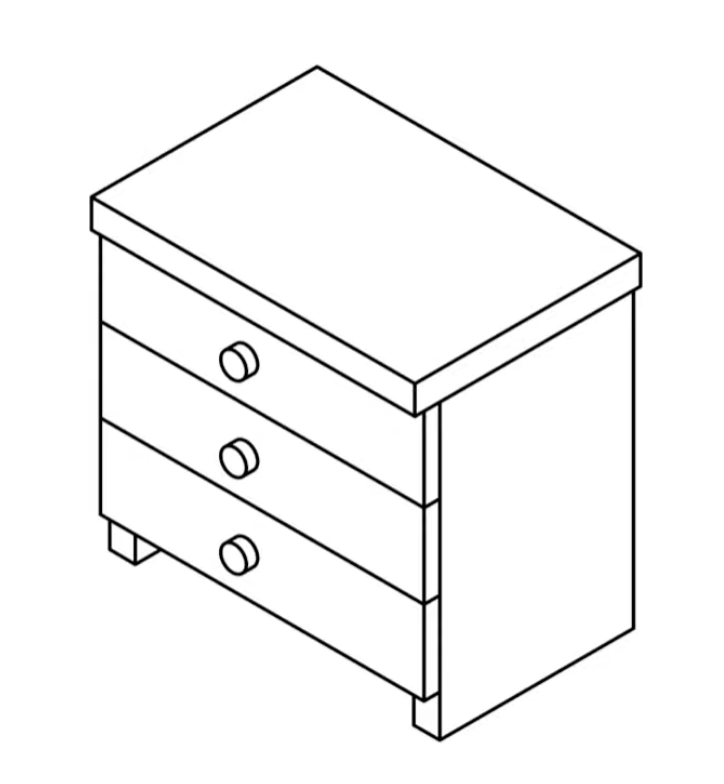
  • When we have multiple items, we store them in a list (like drawers in a cabinet).

List basics

suburbs = ["Newmarket", "Ponsonby", "Parnell", "Grey Lynn"]

# Access by index (starts at 0!)
print(suburbs[0])   # "Newmarket"
print(suburbs[-1])  # "Grey Lynn"

# Add to list
suburbs.append("Mt Eden")
print(len(suburbs)) # 5

List example: Auckland Western Line

western_line = [
    "Britomart", "Parnell", "Newmarket", "Grafton",
    "Mt Eden", "Kingsland", "Morningside", "Baldwin Ave"
]

western_line
['Britomart',
 'Parnell',
 'Newmarket',
 'Grafton',
 'Mt Eden',
 'Kingsland',
 'Morningside',
 'Baldwin Ave']

Indexing and slicing

western_line[1]       # 'Parnell' (not 'Britomart'!)
western_line[2:5]     # slice from index 2 to 4
western_line[-1]      # last element
'Baldwin Ave'

. . .

Modifying:

western_line[3] = 'Auckland City'
western_line.append("new station")
print(western_line)
['Britomart', 'Parnell', 'Newmarket', 'Auckland City', 'Mt Eden', 'Kingsland', 'Morningside', 'Baldwin Ave', 'new station']

Built-in data structures (overview)

Type Example Description
list [1, 2, 3] Ordered, mutable collection
tuple (1, 2, 3) Ordered, immutable collection
dict {'a':1, 'b':2} Key-value mapping

We will cover tuple and dict in the lab.

Practice 2: Fill in the blanks

western_line = ["Britomart", "Parnell", "Newmarket", "Grafton",
    "Mt Eden", "Kingsland", "Morningside", "Baldwin Ave"]

# 1. Create a list of additional stations
more_western = [____, ____, ____, ____, ____]

# 2. Combine the two lists using extend
western_line.______(more_western)

# 3. Print the total number of stations
print(f"Total stations: {____(western_line)}")

Hint: The extra stations are Mt Albert, Avondale, New Lynn, Fruitvale Rd, Glen Eden. Use extend and len.

Part 3: for Loops

for loop

  • Loops allow parts of code to be repeated some number of times.
for variable in collection:
    do things with variable
  • The statement must end with a colon :
  • The body must be indented by 4 spaces
  • No special keyword needed to end the loop

for loop examples

for name in western_line:
    print(name)


Using range:

for value in range(5):
    print(value)
0
1
2
3
4

Looping over two lists

cities = ["Helsinki", "Stockholm", "Oslo", "Reykjavik", "Copenhagen"]
countries = ["Finland", "Sweden", "Norway", "Iceland", "Denmark"]
for i in range(len(cities)):
    print(cities[i], "is the capital of", countries[i])
Helsinki is the capital of Finland
Stockholm is the capital of Sweden
Oslo is the capital of Norway
Reykjavik is the capital of Iceland
Copenhagen is the capital of Denmark

Practice 3: Fill in the blanks

sa2_names = ["Ponsonby", "Grey Lynn", "Mt Eden", "Epsom"]
populations = [8200, 11500, 9300, 7100]

# Print each SA2 area and its population
for i in range(____):
    print(f"{____} has a population of {____}")

Hint: How many items are in sa2_names? Use len(). Then index into both lists with i.

Part 4: Conditional Statements

Conditional statements

  • IF a condition is met, THEN a set of actions is performed.
temperature = 17

if temperature > 25:
    print("it is hot!")
else:
    print("it is not hot!")

if, elif and else

temperature = -3

if temperature > 0:
    print(temperature, "degrees celsius is above freezing")
elif temperature == 0:
    print(temperature, "degrees celsius is at the freezing point")
else:
    print(temperature, "degrees celsius is below freezing")
-3 degrees celsius is below freezing

Combining conditions

Keyword Example Description
and a and b True if both a and b are True
or a or b True if either a or b is True
weather = "rain"
wind_speed = 14
comfort_limit = 10

if (weather == "rain") or (wind_speed >= comfort_limit):
    print("Just stay at home")
else:
    print("Go out and enjoy the weather! :)")

Combining for-loops and conditionals

temperatures = [0, 12, 17, 28, 30]

for temperature in temperatures:
    if temperature > 25:
        print(temperature, "is hot")
    else:
        print(temperature, "is not hot")
0 is not hot
12 is not hot
17 is not hot
28 is hot
30 is hot

Practice 4: Fill in the blanks

sa2_names = ["Ponsonby", "Grey Lynn", "Mt Eden", "Epsom"]
populations = [8200, 11500, 9300, 7100]

for i in range(len(sa2_names)):
    if populations[i] ____ 9000:
        print(f"{sa2_names[i]} is a _____ area")
    else:
        print(f"{sa2_names[i]} is a _____ area")

Hint: Use > for the comparison. Fill in “larger” and “smaller” (or similar labels of your choice).

What You Will Build

Your journey this semester

Week 1-2: Hello World + Python Fundamentals (you are here!)
  ↓
Week 4: Your First Map (Assignment 1)
  ↓
Week 8: Interactive Web Dashboard (Assignment 2)
  ↓
Week 12: Published Python Package (Assignment 3)

Week 12 goal:

pip install your-urban-toolkit
from your_package import calculate_walkability
score = calculate_walkability(streets, amenities)

Documentation

  • Hang on, do I have to memorise everything?
  • The answer is NO
  • LLMs (Yes, but please go back and examine retrospectively)
  • Web book: https://dataandcrowd.github.io/python-gis/
  • Visit https://www.python.org/doc
  • Google your problem

Summary

  • We code because GIS software alone cannot automate, reproduce, and scale our analyses
  • Python is open source, has a massive ecosystem, and ensures reproducibility
  • Today we covered:
    • Variables and data types (int, float, str, bool)
    • Lists (indexing, slicing, appending)
    • for loops (iterating over collections)
    • Conditional statements (if, elif, else)

Next week

  • Recap of today’s work + working on conditions
  • How to import spreadsheet data on Colab: dataframe
  • How to clean and use dataframes

References

  • Tekanen et al. (2022), Introduction to Python for Geographic Data Analysis, https://pythongis.org/
  • Rey et al. (2020), Geographic Data Science with Python, https://geographicdata.science/book
  • Dorman et al (2023), Geocomputation with Python, https://py.geocompx.org/

Thanks!
Q & A