3.1 Web GIS, WASM, and Shiny
What you will learn
- What runs in the browser versus on the server.
- Why large Python packages slow down browser-based deployments.
- How to choose a deployment approach for a Folium-first app.
Static Maps: Why We Still Use Them
The good part about static maps is the author controls exactly what the viewer sees. Static mapping supports precise control over symbolisation, classification, layout, annotation, and visual hierarchy, which is central to cartographic design and thematic mapping. Moreover, because static maps serve as a fixed record. They are excellent for legal documents, historical archives, or reports where you need to show exactly what the data looked like on a specific date without it updating automatically.
Take central Auckland as an example. You can see that the ‘Reds’ have a high population density and the ‘Greens’ have a low population density per mesh block (a small geographic unit used in the census), which fades away the further you go from the city.
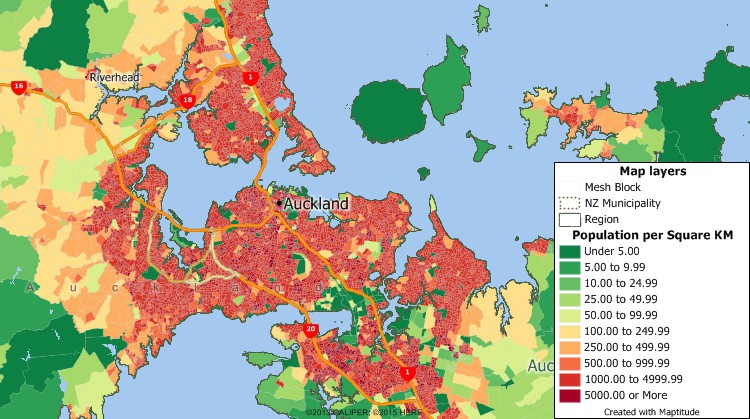
Another advantage is that it provides one narrative message. No zooming or panning around, just print out and the map-maker can guide the viewer’s eye to the specific story or “message” of the map without distractions.
No internet required. Often times, we don’t realise that webmaps (OpenStreetMaps) run under the internet. But static maps, you only need a code chunk and a computer - that is it!
Static Maps - Where They Fall Short
Zero Interactivity: Users can’t click a feature to see more metadata, toggle layers on and off, or change the base map to get more context.
“Frozen” Data: The moment a static map is exported, the data begins to age. If the underlying data changes (e.g., real-time traffic or weather), the map becomes obsolete almost instantly.
Scale Restrictions: You are stuck with the scale the creator chose. If you want to see the street-level detail on a national-level static map, you’re out of luck—it just becomes a blur of pixels.
Information Overload: Since you can’t “filter” a static map, trying to show too many variables at once often leads to a cluttered, unreadable mess.
Seriously, which files should I use
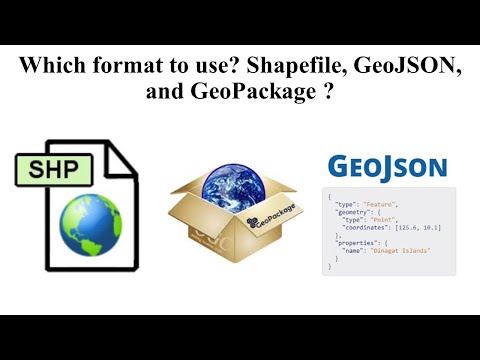
It is a classic WebGIS dilemma: GeoJSON is technically “worse” (larger, slower, memory-heavy) but “better” for the web.
In the area of Geographic Information Systems (GIS), the choice of data format significantly impacts data management, interoperability, and overall project efficiency.
According to the Medium blog by Felipe Limeira (medium blog, Oct 2024), while GeoPackage (GPKG) is the superior choice for comprehensive data management and performance, GeoJSON remains the “de facto” standard for web applications and real-time data exchange.
Here is why GeoJSON is still the king of the web despite being “clunky”:
- It Speaks “Native” JavaScript The “JSON” in GeoJSON stands for JavaScript Object Notation. Because almost all WebGIS applications (Leaflet, Mapbox, OpenLayers) are built with JavaScript, GeoJSON is natively understood.
No “Translator” needed: To use a GeoPackage in a browser, you often need a complex library (like sql.js) to “read” the SQLite database. With GeoJSON, the browser just sees it as a standard JavaScript object. It’s ready to use the moment it’s downloaded.
- Human-Readability & Debugging If a web map isn’t loading correctly, you can open a GeoJSON file in any text editor (or the browser console) and read it like a sentence.
Instant Verification: You can see exactly which attribute is broken or where a coordinate is misplaced. You can’t do that with the binary “blob” of a GeoPackage or the multiple cryptic files of a Shapefile.
Web API Dominance Most modern web services (APIs) communicate via JSON. If you are building a WebGIS that pulls live weather data, transit locations, or social media check-ins, that data is almost certainly arriving as GeoJSON. It fits perfectly into the “REST API” architecture of the modern internet.
Version Control Friendly (GitHub) Because GeoJSON is text-based, it works beautifully with version control systems like Git.
Track Changes: You can see exactly which line (feature) changed in a “diff.” Binary formats like GPKG or SHP are “black boxes” to Git; if you change one coordinate, the whole file looks different to the system.
- Simplicity for Small Datasets For a map showing 50 coffee shop locations, the overhead of setting up a SQLite-based GeoPackage is overkill. A GeoJSON is a single, “dumb” file that “just works.”
When should I stop using GeoJSON?
In your WebGIS chapter, you can mention that GeoJSON hits a “performance wall” around 5MB to 10MB. Beyond that:
Memory Issues: Browsers have to load the entire GeoJSON into the computer’s RAM before showing it. A 50MB GeoJSON will crash most mobile browsers.
The Alternative: This is where you might mention Vector Tiles or FlatGeobuf. FlatGeobuf is a newer “web-optimized” binary format that is fast like a GeoPackage but can be “streamed” to a browser without loading the whole file at once.
| Feature | Shapefile (.shp) | GeoJSON (.geojson) | GeoPackage (.gpkg) |
|---|---|---|---|
| Primary use | Legacy data exchange and desktop GIS compatibility | Web display and lightweight data exchange | Data storage and desktop or local analysis |
| Format | Binary with multiple companion files | Text (JSON) | Binary (SQLite database) |
| Readability | Not human-readable; fragmented structure | Human-readable and easily debuggable | Requires specialised software or drivers |
| Speed | Moderate for small datasets; degrades at scale | Slower due to text parsing and larger size | Fast due to indexing and database storage |
| Web native | No | Yes (JavaScript-ready) | No (requires server-side processing or WASM) |
| File structure | Multiple files (.shp, .dbf, .shx, .prj) | Single file | Single file |
| Scalability | Poor; 2 GB size limit | Limited; memory-bound in browsers | High; supports large datasets |
| Support for multiple layers | No | No | Yes |
| Typical role in WebGIS | Input or legacy source | Delivery and API response format | Backend storage and analysis |
The Rise of Serverless WebGIS: WebAssembly (WASM)
In traditional WebGIS, the browser is just a “dumb terminal” (haha funny Gemini said dumb) that asks a server to do the heavy lifting. WebAssembly (WASM) flips this script. It is a binary instruction format that allows languages like Python, R, and C++ to run inside the web browser at near-native speeds.
Wasm is designed as a portable compilation target for programming languages, enabling deployment on the web for client and server applications .
Why WASM is a Game Changer for GIS
Desktop Speed in a Browser: WASM is designed to be compact and fast. It executes complex spatial algorithms (like polygon clipping or interpolation) as if they were running locally on your machine. To host your Shiny Dashboard at desktop speed! ! The WASM machine is designed to load quickly as possible using an efficient binary format. Then this will help execute code as you run locally. You do not need a server to communicate (shinyapps.io)
The End of Server Costs: Since the code runs on the user’s CPU, you don’t need a powerful backend. You can host a fully functional GIS dashboard on GitHub Pages for free.
The “WAT” Factor: While WASM is binary (machine-readable), it has a sister format called .wat (WebAssembly Text). This makes it surprisingly “open” for a binary format, allowing developers to debug and audit the code.
Finally, WASM also supports inspection and experimentation during development and teaching. While the compiled WASM itself is binary, the surrounding toolchains and bindings allow developers and learners to interact with readable source code, making debugging, testing, and pedagogical exploration more transparent than traditional server-side black-box deployments.
Here is a list of languages that host wasm:
Ada
AssemblyScript (a TypeScript-like syntax)
C/C++
C#
Cobol
D
Dart
via Flutter
F#
Go
Grain
Haskell: GHC WebAssembly backend, Asterius
Java: TeaVM, j2wasm
Kotlin
Lua
Moonbit
Pascal
PHP
Python: **Pyodide**, Nuitka (py2wasm), and Pygbag (This is based on python-wasm, but mentioned separately because it gives pygame support)
R
RemObjects Elements
Ruby
Rust
Scala.js
Scheme
Swift
Zig
Pyodide is a port of Python and many packages, compiled to WebAssembly.
Running Shiny applications in the browser with shinylive
text directly copied from the shinylive website (https://shiny.posit.co/py/get-started/shinylive.html)
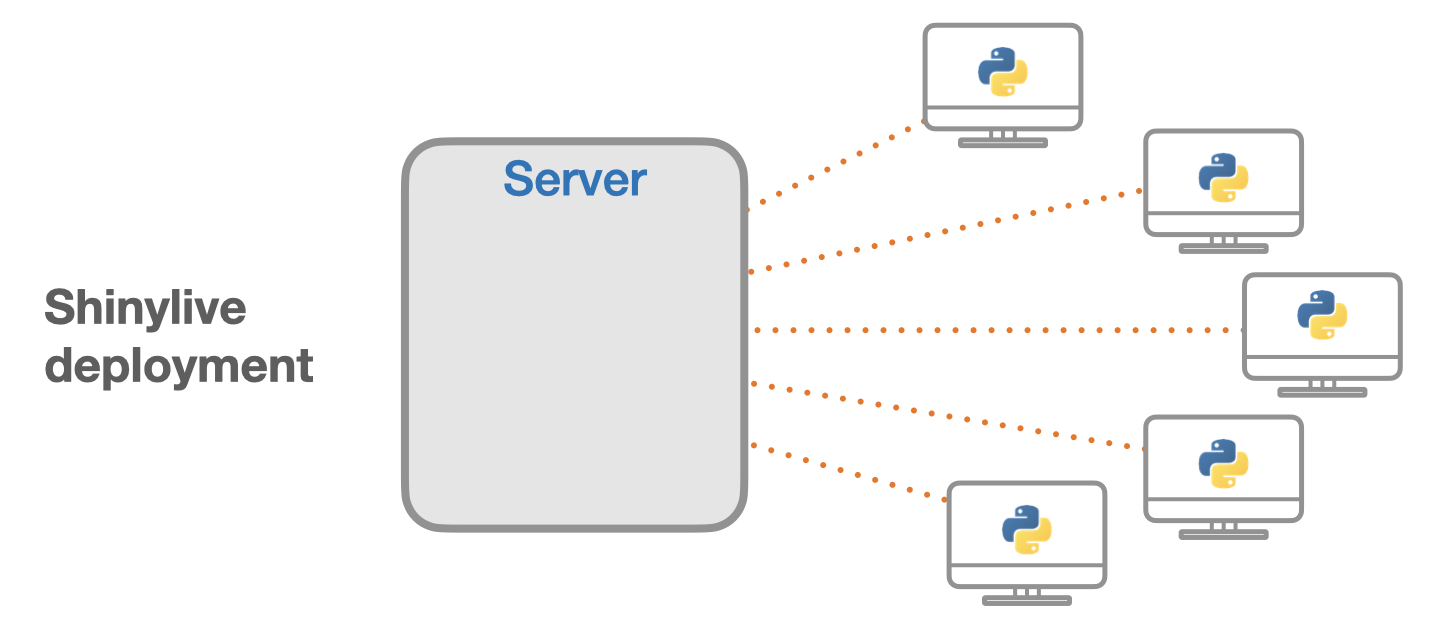
Applications deployed with Shinylive have some advantages and disadvantages compared to a traditional Shiny deployment. The advantages include:
- No installation: No need to install Python or Shiny on a computer.
- Easy sharing: Share applications with just a URL.
- Easy deployment: Applications can be deployed to any static web hosting service.
- Easy scaling: Since applications can be served as static files on a “dumb” web server it is easy to scale to high * traffic loads.
- Security: Because the code is not running on a server, it eliminates a class of potential security risks. The code * runs in the client web browser’s code sandbox, which a platform that has been battle tested over the years.
Some of the disadvantages of using Shinylive deployments compared to traditional Shiny deployments:
- Fewer packages: Not all Python packages are available in Pyodide.
- Large download size: The downloaded payload size may be significantly larger. Downloading Pyodide and Python * packages to run a Shiny application requires about 13MB of data. Other packages can significantly increase the * amount of data. For example, numpy is 7.5 MB, pandas is 13 MB, and matplotlib is 11.5 MB. However, all of this data * will be cached by the browser so that it will load quickly in subsequent runs.
- No secrets: Code and data for the application must be sent to the browser, so it can’t be kept secret from the user.
- Restricted network: For security reasons, the web browser itself imposes restrictions on network communication.
- For certain types of Shiny applications, some of the limitations can be worked around by pre-processing a data set and including it with the application.
One important difference between traditional Shiny and Shinylive deployments is that compute power is shifted from the server to the client. In many cases, the client browser will have more compute power than a server, especially since the compute power of the user’s machine is not shared across multiple users. However, in other cases, this can be a roadblock, such as when a powerful server is needed to perform very intensive computations or requires access to a private data store.
As of February 2026, I found that the folium (webmap) package is not available in the Pyodide list (https://shiny.posit.co/py/get-started/shinylive.html#installed-packages). This means that Folium will not work on your Shiny app when you use shinyLive. Alternatively, we will learn ipyleaflet to get it through!